Claude Artifacts Become Desktop Apps on Mac and Windows
Anthropic started rolling out Install as app on Nov. 24, turning eligible Claude artifacts into desktop apps with icons and permissions.
AIXVZ
AI agents that sell for you. AIXVZ builds sales agents and automates routine business processes — from first contact to deal.
Learn more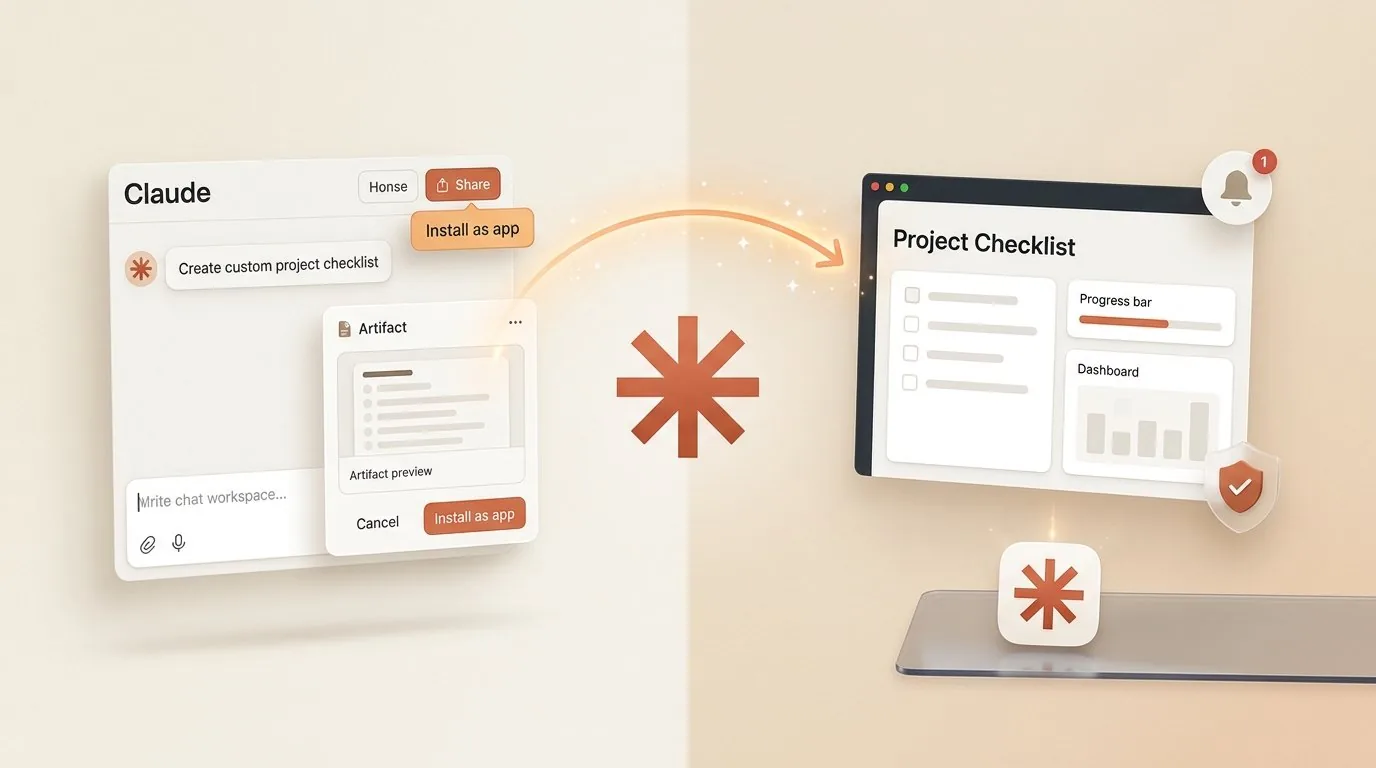
Anthropic began rolling out Install as app on Nov. 24, letting eligible Claude artifacts become desktop apps with their own windows and icons on Mac and Windows. The apps update automatically when the underlying artifact is edited and can request access to notifications or local files. For workers and IT teams, the change turns a chat-built calculator or dashboard into persistent software with separate install and permission decisions.
How installation and permissions work
An artifact is content Claude creates in a separate workspace beside a chat, such as an interactive calculator or dashboard. To install one, a user opens it in Claude Desktop and selects Share then Install as app, using Claude for Mac or Windows version 6.28899.0 or later. Claude Docs, Slides and Sheets cannot be installed this way. The beta is rolling out across Claude plans, with exclusions for HIPAA-ready organizations and hybrid deployments. Installed apps still require a Claude sign-in and internet connection, can use Claude and its connectors, and requests count against plan limits.
Anthropic does not review apps before installation, and full access is limited to apps users make themselves or, on Team and Enterprise plans, apps made within their organization. The company describes three permission levels, with installation and basic app permissions starting on for standard Team configurations while full computer access starts off. On Enterprise, all three start off by default. Administrators can restrict them in Claude organization settings and device management policy, with the stricter policy applying. Device policy is the route when restrictions must also cover personal Claude accounts on company computers.
What to check before using one for work
For employees, the practical effect is speed paired with maintenance risk: a tool built on Monday can open from a desktop icon on Tuesday, yet look unchanged after its logic changes on Wednesday. The company’s chief executive materials frame permissions as a separate review, similar to Mac app permissions, including which connected work accounts an app uses even when it avoids local files. A pilot approach is to build a meeting checklist from sample notes, keep production accounts and sensitive files disconnected, leave full computer access off, and test one permission such as notifications across two users before wider use.
The story does not show that these apps are independently vetted or suitable for regulated work. Anthropic says its Compliance API records app opens and access checks as artifact views, but not installations, permission decisions or actions taken on the computer. An approval applies to one version, while a denial remains until changed, and code loaded from an external site can change without a new request. Organizations needing a record of approvals or local actions will not find it in that log, and the beta exclusions mean some health and hybrid setups cannot use the feature at all.
// Read next
AI labs near cryptography breakthrough as expert panel prepares statement
A 21-expert cryptography panel lists a forthcoming statement as researchers point to an AI breakthrough in theoretical …
Musk: Google Wants to Rent More Computing Capacity From SpaceX
Elon Musk says Google is interested in renting additional computing power from SpaceX, a signal of how tight AI infrast…
RTX 5090 Cable Melt Triggers Air Quality Alarm in PC Owner Room
A Reddit user says a melting 12+4-pin cable on a Gigabyte RTX 5090 filled the room with particles and damaged the GPU p…
YouTuber builds working USB graphics card for 20 cents
Bitluni turned a 13-cent CH570 microcontroller into a monochrome USB graphics card using PWM video tricks and SRAM cach…